Top ways to keep your business’s important data safe and accessible

Cloud storage is the way of the future, when it comes to keeping business data stored safely, and conveniently accessible. There are a lot of benefits to moving your data storage to the cloud, but there are also some considerations you need to think about if you want to make this move with your business files. Here are some of the most important things to look at with cloud storage for your business.

Easily expandable storage space

One of the biggest benefits of cloud storage is that you should be able to ramp up and expand your storage space as needed, easily and cost effectively. When you are looking at pricing of different plans, consider your needs today, and also over the next 5 or 10 years, as your business grows. How easy will it be to add more space, and how much will that cost you as your needs change? It is much easier to plan for growth from the beginning than to switch providers a few years down the road.

Data security

Moving important company documents to the cloud means that you need absolute confidence that the provider will be able to keep them secure. There are different security features to look for. The best services can encrypt your data before it is written to their servers, so that even if someone hacks into your files, they won’t be able to read them. Many services also give you a unique encryption key, so that even their own technical employees cannot read your files. It is also wise to have a password-protection option, so that some files can be restricted to only employees with specific password access.

Edit files locally or in the cloud

Cloud providers work in different ways. Ideally, you want the ability to edit your files directly in the cloud. Employees save time if they do not need to download a file to their computer, work on it, and then upload it again. On the other hand, if you have employees who work disconnected when they are traveling, the ability to download a file to their laptop and edit it on the airplane, can be useful.

Store versions of files

When your provider has versioning support, then each time a file is edited, it saves a new version of the file, rather than updating the old one. This takes additional storage space, but it gives you the ability to go back to an old version of a file if you need to, which can be a lifesaver if something happens to an important file. Collaboration tools When you have a team working together on a project, keeping files in the cloud where they can easily collaborate can save a lot of time. The old system of emailing spreadsheets back and forth could cause a lot of confusion, with multiple versions making the rounds. Allowing the entire team to access a single version of that spreadsheet in the cloud saves time, and ensures that everyone is working with the same information.

Consistent tech support

As far the daily operations of your business are concerned, tech difficulties are not something we can joke about. When company owners and employees can’t have access to important files when they need them, the whole productivity can be in jeopardy; this may cost you a lot of money. When your data is kept safe in the cloud, technical support services are available 24/7.

In case something happens, someone will always be available on the other end of the line to offer assistance. Some providers offer phone and live support, which basically means your issues can be fixed in a matter of minutes.

Modern companies are using cloud computing because it’s the cheapest, safest way of keeping important data safe and accessible. When the information is stored in the cloud, a business owner decides who gets access. You can be at the other end of the world, as long as you have internet connectivity, you have access to the data. Before choosing a provider, perform a thorough research. Opt for cloud storage services that offer the best security; check customer reviews and talk to a representative about an appropriate package deal for your business.

Best Android Racing Apps

New applications for the various smartphone phones so that runners can perform better are incessantly appearing. Tips ranging from training to proper places to run , to health information, route traveled, and other quirks that are available in applications to download over and over again. With the practicality of social networks, it is very simple to share the development and also all the information of the race.

In this article we will introduce you to the five Best Android Racing Apps you should consider installing on your phone so you can perform better on your run and improve your routines:

You can Also Read :- The Best Calorie Counter Apps of 2019

  1. Nike Running :-

Well known among runners, it is one of the oldest applications in the era of smartphone phones. Since 2006 has functions from monitoring and also storage to information of each training. The latest news of the latest update is the inclusion of training sheets: Nike + Coach. The options for beginners, intermediate and also experienced athletes to train to reach goals ranging from 5 to 42 km

 It is available for smartphones with iOS operating system and also Android

The App is free

2. Run Keeper :-

With over 25 million followers across the planet, the app displays detailed statistics with pace, interval and also time. The data is stored and can also be compared. Also, in this way, it is likely to see toward evolution within the sport practiced.

Available for smartphone phones with iOS operating system and also Android.

Downloading is free, both on the App Store and the same way as on Google Play.

3. Strava :-

Another well-known employee app, in addition to the basic functions since training monitoring, shows certain different places from where athletes can change the current route. It also caters for those who enjoy cycling to scooters. The Premium version has more features, from training videos among other interesting things.

Accessible to smartphones with iOS and Android operating systems.

It’s also free.

4. Endomondo :-

This app is known to be a community that works through a free GPS. So, besides running, you are likely to observe other sports such as cycling, skating or walking. The functions are mainly the same as other applications: towards taking time, interval, average brevity, maximum data, among others.

Accessible for phones with operating system iOS, Android and also Windows Phone.

Use of the app is free. One of the best, no doubt.

Introducing 4 Android Racing Apps and even other sports. The best athletes in the world use them to monitor their performance and thus improve their results. Do not hesitate to download any of them and start changing life now. Remember that running is not only a sports that raises the quality of life, it is also possible to lose weight quickly by the high intensity of the sport.

Also Read :- 5 Traveling Applications That Are Must Be Owned While On Holiday Abroad

How to Increase Laptop Battery Backup and Life

Whatever is the configuration of the laptop, the main concern which is most important than any other factor is battery backup. One should know how to increase the battery life time for efficient use of a system. Here are the best ways to boost your battery life time and increase your laptop battery backup.

Also Read:- How To Save Battery Life Of Andorid Mobile Phones?

Startup programs

After installing any software, most of them goes to startup and starts when windows is switched on. By disabling these unwanted programs on startup we can save 12% of the battery life. So how to disable these programs that start automatically at windows startup.

Press Win+R key ( run command) and type msconfig

Which looks like this?

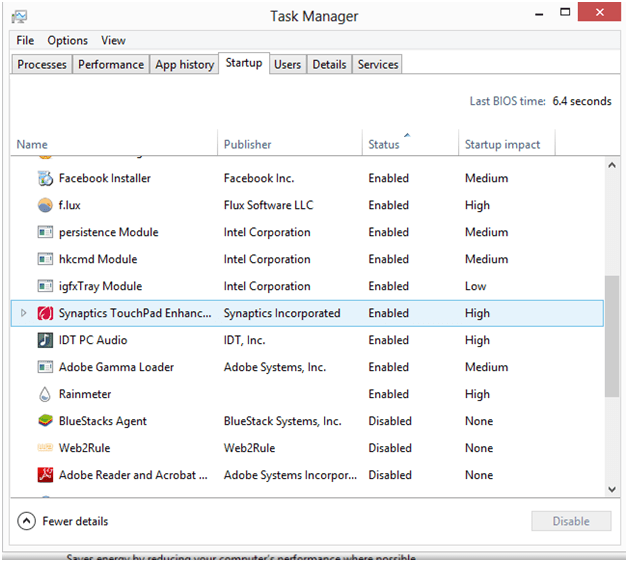
Now click the Startup (for windows 8 and 8.1 this feature is listed in task manager, press Ctrl+Shift+Esc to open task manager and then click Startup)

Which looks like this:

Now, from the given list disable all the programs that you don’t wish to start automatically. (make note that these start up programs reduce system booting time too. So enable only the programs that are very important for you.

Power management

If you’re using Windows OS you can change your Power management settings from Balanced to Power saver, which saves your battery energy by reducing the computers performance where ever possible.

External devices

You should unplug external devices like external hard drives,USB, mouse, hubs, keyboard,joystick,IR receiver , etc  because external devices plugged in to the USB port constantly draws power from the machine.

It’s better to put computer in hibernate mode or shutdown mode than in Standby/Sleep mode. Sleep mode sometimes can freeze the computer and it can also affect some peripherals, like Wi-Fi adapters.

If a laptop is in sleep mode and then battery goes completely flat and RAM cannot be refreshed and we may lose all state.That’s why hibernating is better. You will certainly save more energy by shutting it down,it’s possible that shutting down and restarting every day can add to wear and tear on the disk which intern leads to a good battery life.

You can save battery Life by turning down the brightness of the screen.Also if you have keyboard backlighting, turn it off.

In windows:  search for Adjust screen brightness in start menu as shown below

In Mac: change the screen brightness from display settings

Overheating also leads to battery degradation.Most laptop batteries have lithium-ion batteries that can be harmed by heat . This heat reduces the battery life and with this prolonged exposure of heat the battery may even become unusable. So, to get rid of this heat use Non-USB powered Cooling Pads.

Disabling Services

Close unused applications :You can save the battery life by disabling the services like Bluetooth, WiFi, muting the system volume when not in use and closing all unwanted windows and applications which usually puts an additional drain on the laptops battery.

Cleaning the battery terminals also helps you to have a better battery life. Clean the battery metal contacts or terminals with cloth dipped in alcohol in every two months and allow to dry before re –inserting.

However there are many ways to improve laptop battery backup and system battery lifetime. If you have any tips and tricks feel free to share with everyone.

How to install SHAREit on pc/computer?

SHAREit which is most used in mobiles is now available on pc/computer.Shareit allows you to send images,videos,files and documents at lightening speed.SHAREit is free of download.

Also Read:- How You Can Install Windows 95 on Apple Watch

Also Read:- Install These Chrome Extensions, And You Are Good To Go

steps for installing SHAREit:

After downloading SHAREit from the above link,Install it on your pc by running it as an administrator.Now open it by double clicking the icon  present on the desktop.Then follow the series of steps:

Step 1:

Step 2:

Step 3:

Step 4:

Features:

  • supports for all operating systems.
  • SHAREit is safe way to share files among your devices. 
  • SHAREit works on all windows,android,apple ios and pc.

4 gadgets that take care of the iPhone 7’s dongle issue

the event that you have an iPhone 7, you’re presumably truly satisfied with yourself. What you’re presumably less satisfied about is the evacuation of the 3.5mm earphone port.

While Apple has packaged a Lightning to 3.5mm earphone jack connector with the iPhone 7 (and offers a swap for $9) this official trinket hoards the single port 

We’ve discovered four inventive items that let you charge your iPhone 7 and tune in to music in the meantime. Envision that. Observe our choices to discover an answer that suits you.

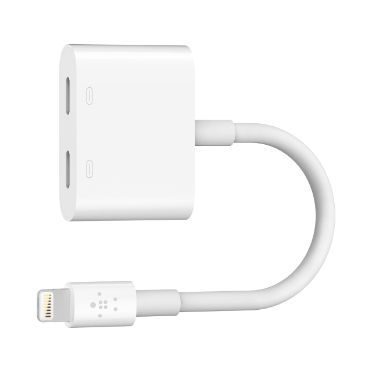
1. Belkin Lightning Audio + Charge RockStar:


Perfect for anyone with Lightning Audio headphones, Belkin’s Lightning Audio + Charge RockStar lets iPhone 7 and 7 Plus owners listen to music, watch video discreetly or make phone calls through Lightning Audio headphones while you charge. 

It features two Lightning ports, supports up to 24-bit 48kHz lossless output and boasts the “Made for iPhone” mark.

2. Fuze Case


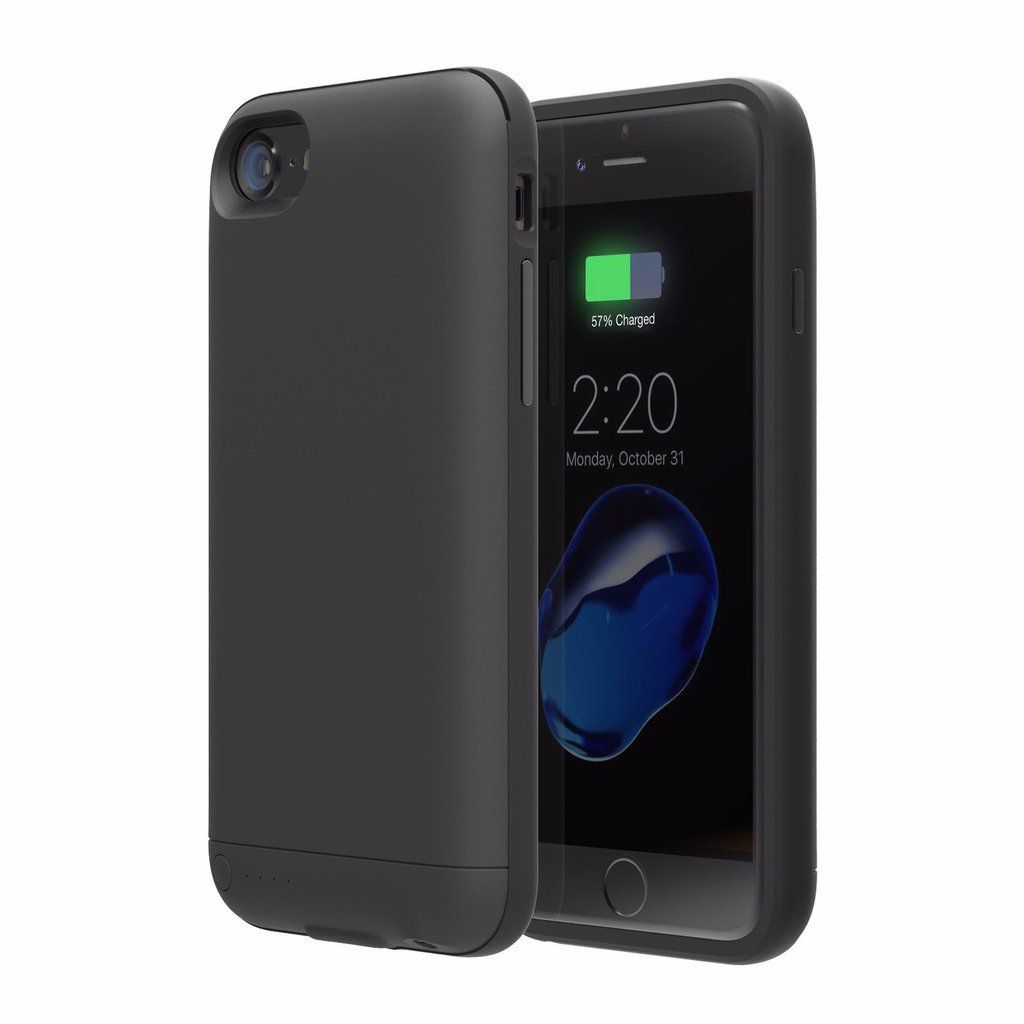
Fuze is a case-based alternative for any individual who doesn’t care for dangling a dongle. By the entrance for the Lightning port, the case reestablishes the telephone’s 3.5mm sound jack. 

Made of sturdy TPU and ABS plastics, you likewise get assurance for your handset. The case is slimline, including 5mm of thickness and 28 grams of weight. 

The genuine offering point is that the case additionally offers an inherent battery, which guarantees to twofold your iPhone 7’s day by day life expectancy.

3. Griffin iTrip Clip Bluetooth Headphone Adapter


Griffin has thought of another, completely extraordinary arrangement — change over your current earphones into ones that work remotely. 

Perfect for anybody that is sprinkled out on costly earphones and still needs to have the capacity to utilize them with their iPhone 7, the iTrip Cut interfaces them remotely to your iPhone utilizing Bluetooth 4.1. You just connect your earphones to the iTrip Cut, combine the thingamajig with your handset and clasp it onto you’re attire or sack. Once matched, the gadget will reconnect naturally in future. 

You can utilize the iTrip Clasp to play, stop, skip tracks, change the volume, enact Siri and make telephone calls


4. Auxilite Converter

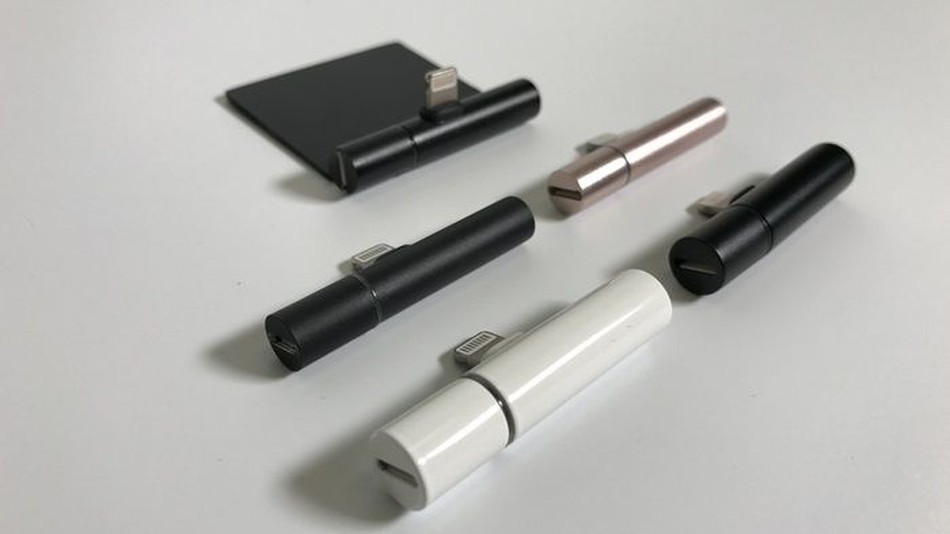
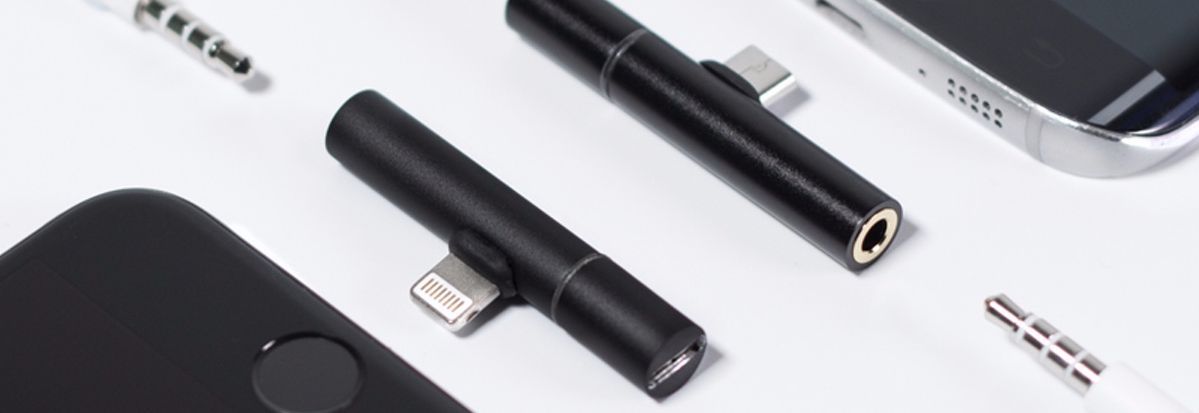
A dongle alternative sending in Spring by means of Indiegogo, the Auxillite is a little gadget that will connect to your iPhone 7’s Lightning port, then offer, on either side of the barrel, a Lightning port and a 3.5mm earphone jack. There’s likewise a model for Android telephones. 

Once connected to, you’ll have the capacity to charge your handset while tuning in to music and other sound.


Design a site like this with WordPress.com
Get started